![avo-icon-sm.png]](https://support.alliancevirtualoffices.com/hs-fs/hubfs/AVO%20Logo/avo-icon-sm.png?width=40&height=40&name=avo-icon-sm.png)
Logging into the Center Portal
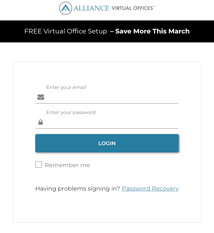
- Go to: alliancevirtualoffices.com/login.
- If you don’t have your login credentials, request them at centers@alliancevirtualoffices.com.
How to notify clients of mail through Delivered
- Once you've logged in to the Center Portal, find your Center in the list and click "Manage".
- In the sidebar menu, click on Delivered.
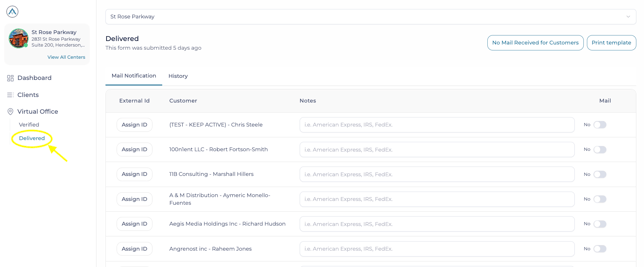
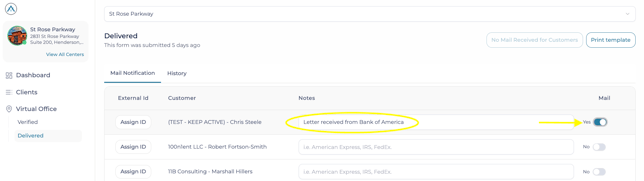
- Under the Mail Notification tab, click on the toggle button for every client who received mail.
- Write a short description in the notes field, such as sender name and/or type of letter or package.
- Scroll to the bottom, and click Submit.
- That's it. An automated email notification will be sent to the selected clients.
IMPORTANT NOTE: Clients who did not receive mail will receive a notification in their portal stating "No Mail Received".
History Tab
In this section, you can view all notifications you’ve sent so far, as well as instances of "No Mail".
No Mail Notification
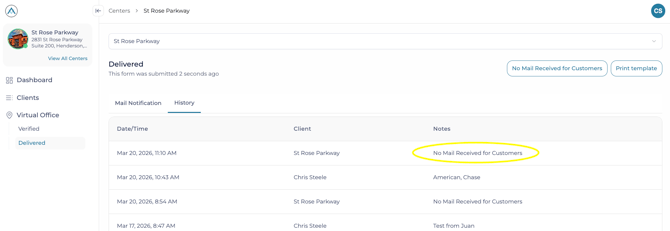
- If you didn't receive any mail for our mutual clients during the day, click "No Mail Received for Customers."
- In the History section, you will see a log that shows "No Mai Received for Customers". Your Center's name will be shown under "Client".
- In the Alliance client portal, clients will be able to see any instances of "No Mail"
Important Note: Clients will see a "No Mail" log until 7 pm your local time. This will ensure that if you clicked on "No Mail" at 10 am, but received mail or packages for some clients at 3 pm, and notified clients via Delivered accordingly, they aren't notified of "No Mail" as well.
Best Practices:
-
Notify our mutual clients as mail comes in and at the very least once per week.
- The easiest way to notify clients is to do it as you sort mail for Alliance clients. Make sure each client folder is labelled with the client's company name and Alliance's name to quickly identify our clients.
If you’d like a walkthrough, watch this DELIVERED TUTORIAL VIDEO or email centers@alliancevirtualoffices.com and we’ll be happy to schedule one for you and your team.